
 By Marvin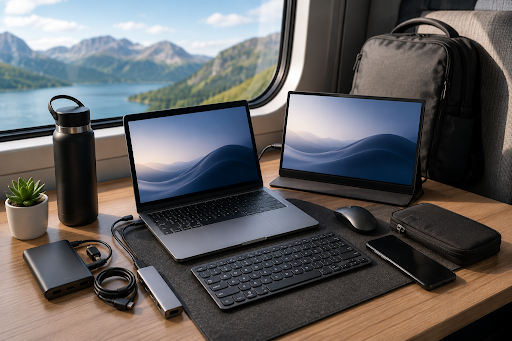
Traveling can be easy and fun if you can stay as productive as at home. A work setup suitable for hotels, cafés, and airports should be light, small, reliable, and versatile.
The best travel tech is not a collection of every device from the office but a carefully selected set of products that are useful when on the road. A lightweight work setup can make productivity possible in a hotel room, airport lounge, or any other place you stop by.
A power-efficient laptop and a portable monitor are usually at its core. Some accessories are often essential, like a second screen, charger, mouse, or USB hub. Selecting the right tech and organizing it can keep the weight of your setup reasonable.
What Is a Travel-Friendly Work Setup?
A travel-friendly work setup is a portable collection of devices, accessories, and equipment that people use to work while away from their office. It can include a laptop, a second screen, essential chargers and cables, and lightweight mouse or keyboard.
Travel tech should be:
- Easy to fit in a bag
- Easy to deploy and repack
- Suitable for different work locations
- Power-efficient for travel
- Plug-and-play with multiple devices
Mobility matters as much as technical capabilities for the vast majority of digital nomads, freelancers, developers, designers, and content creators.
Lightweight Laptop
The laptop is usually the centerpiece of a mobile workstation. A travel laptop should be light enough and powerful enough for daily work.
A 13-inch or 16-inch laptop is often a good balance. Battery life and USB-C support are often critical for mobile workstations.
Does your laptop have enough performance for the main applications? Comfortable use of a lightweight computer is better than carrying an extra heavy laptop.
Portable Second Screen
Working on a laptop screen can be challenging if multiple applications and tools are used. Frequently switching between windows, tabs, and programs is easy when you have enough screen space.
A portable monitor is a lightweight device that provides more screen real estate for reference or additional work areas. The most common uses of a portable display include:
- Displaying reference material while typing or annotating
- Showing a video timeline alongside the editor
- Watching emails or messages during a meeting
- Keeping two or more documents or spreadsheets open at the same time
- Extending a laptop screen for presentation
UPERFECT displays can fit in a backpack, are often as light as a laptop and some offer USB-C support, too, which reduces the number of adapters and cables.
High Brightness for Outdoor Work
Not everyone works in an office or a hotel room. Photographers, field professionals, digital nomads, and content creators may sometimes need to work in balconies, terraces, movie sets, or similar.
In bright environments, higher brightness makes devices more usable. A sunlight monitor is a display that is brighter than most other screens.
Brightness is not the only factor that can matter in direct sunlight, reflections, viewing angle, and color accuracy, for example, can make some screens unusable in the sun. Whenever possible, use shade to make it easier to see a screen.
Important Accessories for a Mobile Office
A lightweight travel work setup focuses on essential and versatile devices. Extra cables, adapters, or accessories that don’t serve a clear purpose are rarely needed.
| Accessory | Usage | Priority Importance for Travel Setup |
| Lightweight laptop | Work device | Essential |
| Portable second screen | Extend laptop screen space | High |
| USB-C charger | Charge USB-powered devices | Essential |
| Power bank | Emergency power source | High |
| Compact mouse | Faster mouse navigation | Medium |
| Foldable laptop stand | Lift laptop screen | Medium |
| USB-C hub | Access additional ports | High |
| Cable organizer | Organizes accessories | Medium |
USB-C multi-port chargers are especially convenient. The right adapter can replace several separate chargers. Before buying an accessory, check its power requirements and compatibility.
Manage Accessories and Cables
Travel setup can be lighter if redundant or unnecessary cables, chargers, and accessories are avoided. If several devices support USB-C, for example, the same cables and charger may work for all of them.
A small USB-C hub can also provide additional HDMI, USB-A, SD card, or Ethernet ports as needed. The ports you need will depend on your work and use cases.
Items you rarely use may not need a permanent place in your carry-on. For example, some cameras, card readers, or smart devices might be available to rent or borrow at your destination.
Light Setup for Different Jobs
Travel work setup requirements are not the same for all professionals. While a writer needs a fast laptop and nothing else, a video editor may need a more powerful computer, additional storage, and screen space.
| Occupation | Suggested Travel Setup |
| Writer | Laptop, compact mouse, portable second screen |
| Video editor | Powerful laptop, external SSD, portable second screen |
| Developer | Laptop, portable second screen, compact keyboard |
| Photographer | Laptop, card reader, external SSD, portable color-capable second screen |
| Business traveler | Laptop, charger, hub, small second screen |
As you can see, each professional might need a different work setup while traveling. Writers might care about battery life and minimal weight while video editors are often fine with additional weight in exchange for more storage and screen space.
Keep Devices Safe While Traveling
A portable work setup should be safe when traveling. Packing laptops, tablets, portable displays, chargers, and adapters properly can protect them during travel.
Keep laptops, computers, and portable monitor in a padded compartment or sleeve. Heavy objects should not rest directly against a screen.
Always keep files backed up before a trip. Cloud storage and external drive can help with device protection against loss or failure. For public Wi-Fi, security practices and exercise caution when using certain accounts or sites on untrusted networks.
Tips for a Lightweight Travel Setup
Travel setups are not always practical. Review what you used during your previous trip before buying or packing before each journey. It might seem trivial, but reducing just one charger, cable, stand, or peripheral can make a setup more travel-friendly.
Try to prioritize devices and accessories that have more than one use. A portable second screen, for example, can be used to provide more space for work, as a presentation screen, for entertainment, or as a second screen for compatible devices.
Travel technology is not necessarily the smallest or most compact devices. It is the technology that has enough functionality to be worth its space and weight.
FAQs
What is the most important device in a travel-friendly work setup?
The laptop or tablet is the main work device for most professionals and should be the most important piece of equipment in a travel work setup.
Is it worth carrying a second monitor while traveling?
Yes, a second monitor can be useful for those who work with multiple apps, documents, dashboards, or other tools. A second screen can significantly improve productivity.
How can I reduce the number of chargers I need to carry?
Consider a USB-C multi-port charger with a high enough power output for all your devices. Check device compatibility and power requirements first, then use one adapter.
Which factors are important for a display I can use outdoors?
Brightness is the most important but you should also consider glare and reflections, screen finish, power consumption, viewing angle, and other factors.
How much should a mobile work setup weigh?
There is no one-size-fits-all correct or ideal weight. Your travel work setup should be as heavy as you can comfortably carry with the devices you need.
Final Thoughts
Travel-friendly work setups don’t have to be complicated or heavy. A work laptop, essential accessories, and some care during packing and travel can keep weight manageable.
Travel setup is easy if the right tech is chosen and properly organized. A laptop, portable monitor, charger, and hub can fit in a travel backpack.
Being able to work in hotels, coworking spaces, cafés, or airports is great, but so is being able to work in an open field, on the beach, or under a tree.